- Client
- UK marine business
- Product
- QuickBooks Desktop Premier Accountant Edition 2020 UK
- Problem
- Activation blocked company-file setup on a new PC
- Outcome
- Activated and ready to create a company file
Installed, but unable to finish setup
The client had installed QuickBooks Desktop Premier 2020 UK from disc on a new computer. Because the PC had no built-in disc drive, they used an external reader. Installation completed, but getting to a usable company-file setup was another matter.
QuickBooks requested a validation code and customer number and displayed a prompt to call Intuit. Choosing Activate Later opened the Welcome screen, but attempting to create a new company brought the activation screen back. The Next button remained greyed out while the required validation details were missing.
A Missing PDF component warning also appeared when QuickBooks opened. Together, the two messages made a completed installation look like a broken copy.
The main blocker was activation, not the disc
QuickBooks could launch and the licence and product numbers had already been entered. In this case, the remaining step was completing validation with the matching details supplied with the customer's software pack—not repeating the installation or replacing the disc.
Installation and activation are separate stages. Reaching the Welcome screen after selecting Activate Later did not demonstrate that activation had finished.
Why the PDF warning needed its own diagnosis
Word and Excel could still create PDFs, but that did not rule out a problem with the components QuickBooks uses for its own PDF functions. We treated the warning separately rather than assuming it explained the activation loop. Activation was addressed first; the PDF warning was then dealt with so setup could continue without interruption.
Screens from the support session
These customer-supplied photographs show the issues before resolution, not a completed activation. They have been cropped to remove unrelated desktop content and redacted where needed to protect private details.
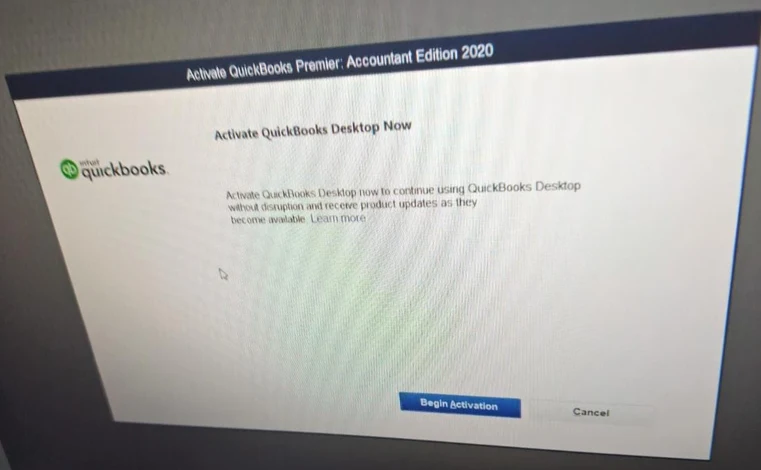
1. Activation still required
The installed application opened, but still required activation before the client could finish setup.
View larger : Activation still required (opens in a new tab)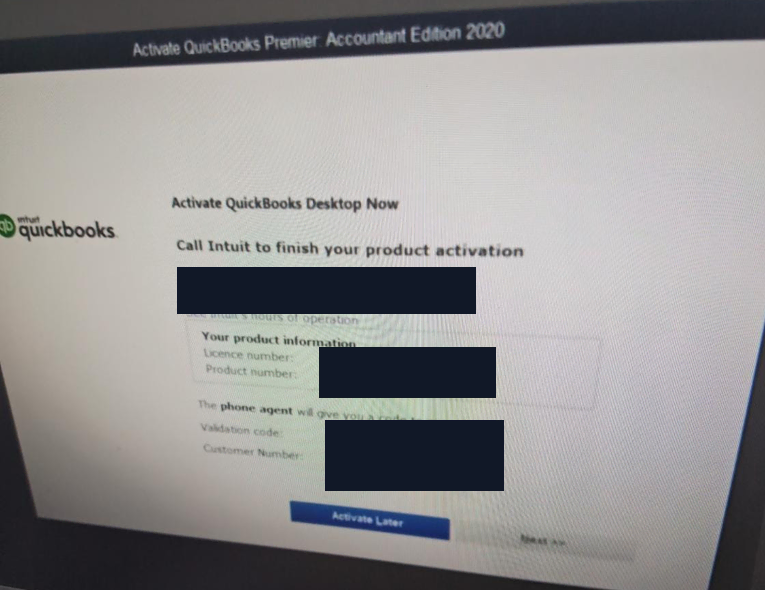
2. Validation blocked the next step
The validation screen showed an unavailable Next button. Phone numbers, licence and product details, and validation fields have been permanently redacted.
View larger : Validation blocked the next step (opens in a new tab)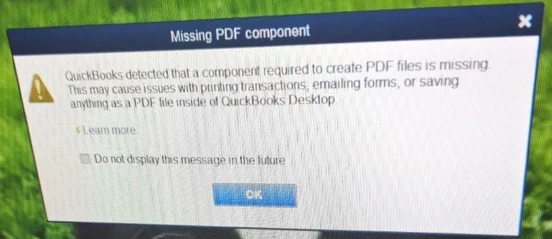
3. A separate PDF component warning
This warning concerned QuickBooks PDF functions. It was investigated separately from the activation requirement.
View larger : A separate PDF component warning (opens in a new tab)How HCMA Softtech resolved it
- Confirmed that the installed product was QuickBooks Desktop Premier Accountant Edition 2020 and checked its details against the supplied software pack.
- Separated the activation requirement from the PDF component warning so each issue could be addressed on its own.
- Guided the client to run QuickBooks as administrator during troubleshooting.
- Matched the on-screen product details to the licence ticket and entered the appropriate activation details supplied with that customer's pack.
- Completed activation, making Next available, and checked that the client could continue to Create a new company file without returning to the validation prompt.
- Addressed the separate PDF warning so it no longer interrupted setup.
Activated and ready for company-file setup
- QuickBooks opened on the new PC with activation completed.
- The client could proceed to create a new company file without returning to the validation prompt.
- The PDF warning was no longer blocking setup.
A successful legacy setup is not a compatibility guarantee
This was a specific resolution for an existing QuickBooks 2020 installation and its supplied licence details. It is not a promise that every older edition can be installed or activated on every new Windows PC. Successful activation also does not establish current vendor support, security-update availability or access to connected services.
Before moving legacy accounting software, check the exact edition, licence rights, operating-system compatibility and available activation route. If an existing company file is involved, back it up before making changes and assess whether a supported alternative is more appropriate.
Customer contact details, licence numbers, product codes and validation details are not published.