- Client
- Existing UK business customer
- Software
- QuickBooks Desktop
- Problem
- Sales VAT at 0%; new invoices reverted to the old code
- Outcome
- New standard-rated invoices using the 20% code
The right rate would not stay selected
An existing customer contacted HCMA Softtech because their QuickBooks Desktop invoices were no longer calculating the expected VAT on standard-rated sales. The code labelled S had a sales rate of 0%, and attempts to change it back were reportedly causing the application to crash.
The client had already created an alternative code, STA, at 20%. Selecting it manually worked, but a new invoice would return to S. They needed a reliable setup rather than remembering to correct the VAT code on every invoice.
Two settings explained the behaviour
The VAT screen showed S selected with a sales rate of 0.00, while its purchase rate was still 20.00. A correct purchase rate therefore did not mean the sales side was configured correctly.
There was also a default-code problem. Updating the company default had not removed S from existing customer records. Those saved settings still needed attention so the relevant new invoices would use STA consistently.
S and STA are the code names in this customer's company file, not universal instructions for every QuickBooks installation.
What the support screenshots showed
These images document the problem before resolution. They have been cropped to remove account balances and unrelated content. Private messages, names, contact details and customer identifiers are not included.
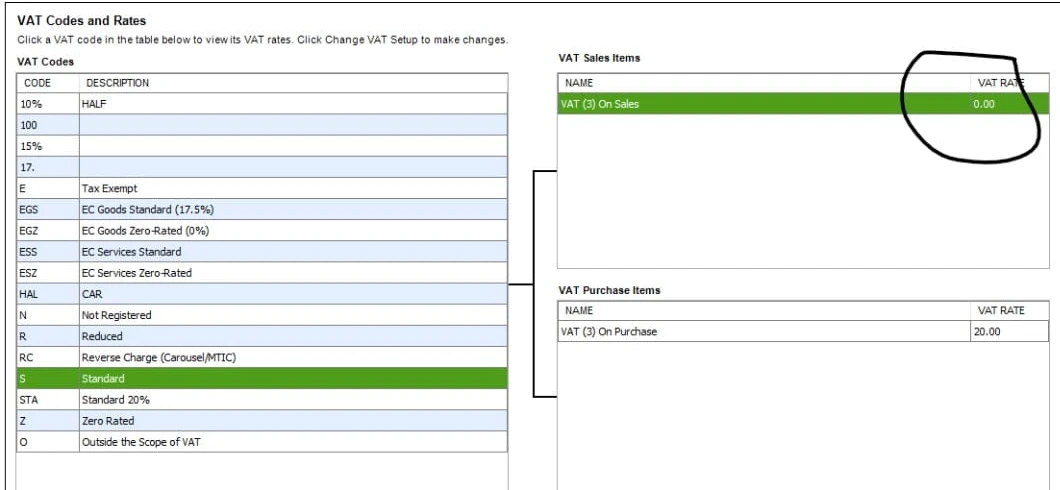
The sales and purchase rates did not match
Before the fix: S had a sales VAT rate of 0.00, while its purchase VAT rate remained 20.00. The STA code was also visible in the list.
View larger : The sales and purchase rates did not match (opens in a new tab)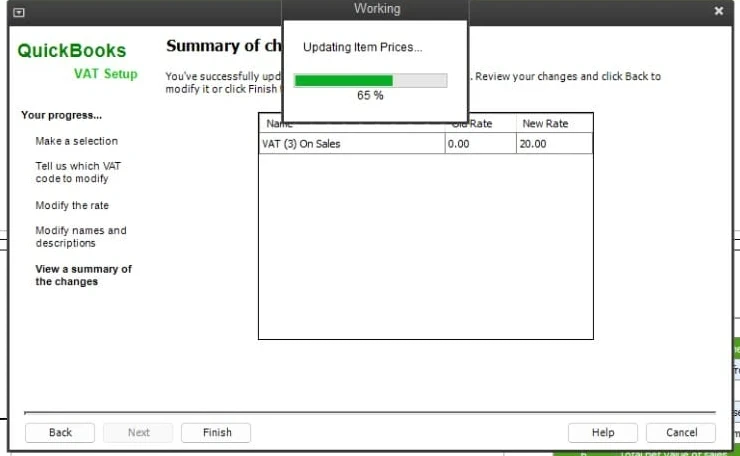
The attempted rate change was reported to stall
The client reported that the VAT-rate change stopped progressing at 65%. This screenshot captures that stage of the change; it does not show a completed repair.
View larger : The attempted rate change was reported to stall (opens in a new tab)The 65% progress window belongs to the QuickBooks VAT Setup change and says Updating Item Prices. It shows an attempted VAT-rate change, not an unrelated background software update. The screenshot alone does not establish why progress had stopped.
How HCMA Softtech resolved it
- Reviewed the VAT setup and distinguished the sales rate of 0.00 from the purchase rate of 20.00 on code S.
- Advised against repeatedly retrying the same rate change while the client was reporting crashes or a stalled update.
- Used the client's existing STA code, configured for 20% standard-rated sales, on the relevant new invoice lines.
- Checked the company and relevant product or service defaults, then addressed existing customer records still referring to S.
- Explained that the review should include every relevant customer who would be invoiced again—not only customers with an outstanding balance.
- Kept the default changes focused on future invoices, without rewriting issued invoices or altering existing balances as part of this fix.
Back to consistent VAT on new invoices
- New standard-rated invoices used STA and calculated VAT at 20%.
- The saved defaults no longer kept returning those invoices to S.
- Existing customer balances were not disturbed by the default-code changes.
- The client could continue invoicing the same day.
Correct future defaults without rewriting the past
An outstanding balance was not the test for which customer records needed attention. The relevant records were those that would be used for future standard-rated invoices, including customers whose current balance was zero.
This was a software configuration fix, not a VAT compliance review. A 20% code is not appropriate for every transaction, customer or tax treatment. Check the correct treatment with your accountant, and back up the company file before changing VAT settings.
Changing a default does not correct earlier invoices or VAT returns. If any issued invoices contain a VAT error, ask your accountant about the appropriate correction process rather than silently editing historical records or assuming the new default fixes them.